
Previous step: Managing Subscription Plans
Transkribus requires credits to perform text and layout recognition and the credit consumption is based on the type of material (handwritten or printed).
When you sign up for a Transkribus account, you will receive 50 free credits to use for text recognition every month. These credits are given to you so that you can freely explore and test the text recognition features of Transkribus.
To learn more about the pricing system, including a detailed breakdown of the plans, features, and allowances, please visit the dedicated information page on our website. Keep in mind that your monthly credits will expire at the end of your subscription cycle, and your plan will automatically renew to ensure uninterrupted access. Please read the Subscription Management Terms for more details.
1. Credit Usage
The order in which credits are deducted is as follows:
- If the user has a paid subscription plan, the credits from the paid plan are used first, because they have high priority.
- Expiring credits (at the end of the subscription cycle) are always used first within the respective level (collection or personal).
- If a user has a subscription, Add-On credit packages are used second. Add-On credit packages do not expire.
- Free credits are used first only when no other credits are available. Otherwise, they are consumed after any subscription credits, purchased add-on credits, or transferred credits.
| Credit Type | Can be shared? | Order of Usage |
| Scholar Subscription | No | 1st (Default) |
| Team Subscription | Yes | 1st (Default) |
| Organisational Subscription | Yes | 1st (Default) |
| READ-COOP membership | Yes | 1st (Default) |
| Add-On | No | 2nd |
| Transferred (to user) | Yes | 3rd |
| Free (Subscription/Scholarship) | No | 4th |
To learn more about the pricing system, including a detailed breakdown of the plans, features, and allowances, please visit the dedicated information page on our website
2. Manage credit usage
To easily view and manage your personal credits, you can follow these steps:
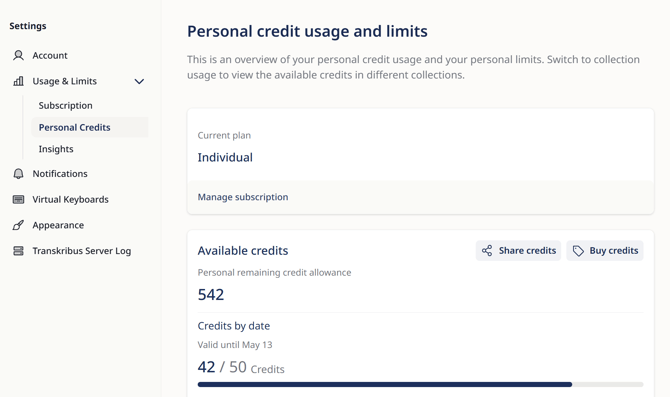
- To access the "Usage&Limits" dashboard for your account, click on "Settings" located in the lower left corner and select "Personal Credits". This is an overview of your personal credit usage and your personal limits.
- Under "Insights" you can see a comprehensive overview of your activity within Transkribus, including details about your recognition runs and saved edits.
3. Sharing Credits
Not all credits can be shared. However, if you have a Team or an Organisational subscription plan, or if your organisation is a READ-COOP member, you can can transfer credits to other users within your team or organisation.
In this situation, the transferred credits are allocated to the user, allowing them to utilise them across all of their collections.
If you would like to transfer credits to a specific user in your Team or Organisational plan, go to Settings and click on "Credits & Limits". Search for the user by their email address that is linked to their Transkribus account. Once you have located the user, simply choose them and confirm the transfer.
Credit transfers outside these contexts are no longer possible.
Please note: Addon-Credits are no longer shareable with a collection. If you have any further questions regarding the shareability of Addon-Credits, please contact our Help Team here: Contact Form
Once credits have been transferred to another account, it is not possible to retrieve them. However, since the credits are shareable, you can kindly request the user to share the transferred credits or a portion of them back with you.
Next step: Managing User Seats