
How to cancel your subscription plan?
To cancel your subscription, please follow these steps:
- Click on "Settings" in the lower left corner of your screen.
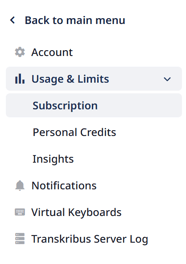
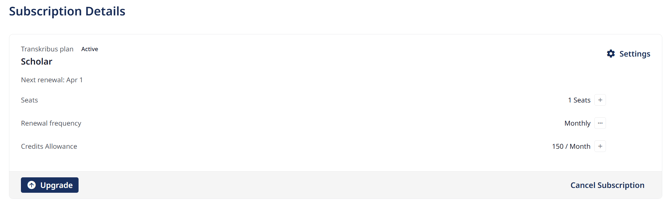
- Then click the drop down menu "Usage & Limits" and then select "Subscription". Here you can see your current Subscription Plan.
- Click on "Cancel Subscription" right below your plan and follow the prompts to complete the cancellation process.
After cancellation you will retain access to your plans features until the end of your renewal period.
For more details—including notice periods, billing cycles, and other terms—please consult our Subscription Management Terms.
Not that you will not lose any of your previous changes or edits and you will not lose access to your account or material by cancelling your subscription.
How to cancel your subscription on a Free Plan?
If you are on a free Individual Plan in Transkribus you do not need to cancel your subscription.
You can look up your current plan under "Usage&Limits" - "Subscription" in "Settings".
If you stay on the Free plan, you don't need to take any further action.
For more information you can have a look here: Subscription Plans Overview.